Disclaimer ⚖️ Link to heading
The tools and techniques discussed in this blog are intended for educational purposes only. Unauthorized use of these methods on systems you do not own or have explicit permission to test is illegal and unethical. I do not condone or take any responsibility for misuse, illegal actions, or damages caused by applying this information.
Picking it back up Link to heading
This blog is about the HTB Tier 2 Machine “Vaccine”. For the record, I started the machine already some time back. I already finished 6 out of 9 Tasks but I don’t remember where I left off. That’s why I will treat this as a blackbox and start from the beginning.
Enumeration 🔬 Link to heading
Ping, pong 💡 Link to heading
I always start by checking if the host is reachable for me. In this case a good old ping was enough to confirm that the target is up.
But what do we do if the ping doesn’t work or times out? Does that mean the host is unreachable? Not necessarily, some firewall’s or host’s drop ping requests. But what is a ping request and what alternatives do we have? Ping is sending an ICMP (Internet Control Message Protocol) request to the target. There are different kind of ICMP requests but more on that later. Alternative wise we have nmap giving us different options for host discovery:
$ nmap -h
...
-PE/PP/PM: ICMP echo, timestamp, and netmask request discovery probes
...
- -PE =
ICMP echo requestthe same asping(ICMP Type 8) - -PP =
ICMP Timestamp request(ICMP Type 13) - -PM =
ICMP Address Mask request(ICMP Type 17)
You need to experiment with these options if a host appears down. But generally speaking you can say that Type 13 and Type 17 are more rare but can bypass some firewalls if Type 8 doesn’t work. What about you? Do you have any other tricks up your sleeve? Let me know in the comment section!
Port scanning Link to heading
Now we are certain the host is up, let’s check the top 100 TCP port’s to see what services run. I always store every single scan result in a dedicated folder. This way I can check if something changed over time and don’t need to rescan if my terminal history runs out.
$ sudo nmap -sS -sV --top-ports 100 -oA scan1 10.129.189.139
Nmap scan report for 10.129.189.139
Host is up (0.022s latency).
Not shown: 97 closed tcp ports (reset)
PORT   STATE SERVICE VERSION
21/tcp open  ftp     vsftpd 3.0.3
22/tcp open  ssh     OpenSSH 8.0p1 Ubuntu 6ubuntu0.1 (Ubuntu Linux; protocol 2.0)
80/tcp open  http    Apache httpd 2.4.41 ((Ubuntu))
Service Info: OSs: Unix, Linux; CPE: cpe:/o:linux:linux_kernel
Q1: Besides SSH and HTTP, what other service is hosted on this box? Link to heading
Now we can answer the first question already. The third services running on this box is FTP.
Webserver Link to heading
Webservers always spot my curiossity so let’s check out the webserver first. I do so by curl to see if we get anything interesting back worth looking at in the browser. Or if it’s just the standard Apache 2 site.
$ curl -v 10.129.189.139
...

< HTTP/1.1 200 OK

...

<h1 align=center>MegaCorp Login</h1>
That definetely looks interesting to me! I checked it in the browser briefly. Looks like a Login form built with Bootstrap or something similar. Worth exploring some default creds, folders and source code analysis.
FTP Link to heading
The first thing I think of thinking about FTP security wise is anonymous login. And indeed we can establish an anonymous connection via FTP! And looking at the directory content via FTP, we find a backup.zip file. Let’s grab a hold of that file and take a look inside.
backup.zip Link to heading
Unfortunately for us the backup.zip is password secured. By trying to extract it with the unzip util or by looking at it with zipdetails we see that the zip contains an index.php file. This is a very valuable target, as this could give us invaluable insights how the login of the webserver work!
But how do we continue from here? Before I bruteforce anything, I always try some standard passwords and some that make sense to me in the scenario:
- password
- MegaCorp
- backup
- qwerty123
After attempting that for 10 minutes and adding suffixes like 01, 1234 and other usual stuff I was unlucky.
So I guess it’s time to figure out how to crack zip passwords! By typing zip + Tab in my kali linux shell I found something called zip2john.
I know that john aka John the Ripper is a bruteforcer. And by looking at the help page of zip2john I found out that it will try to extract password hashes from the zip file in a format that john can understand and bruteforce.
Said and done. By combining these two programms I was able to find the Zip password and extract it.
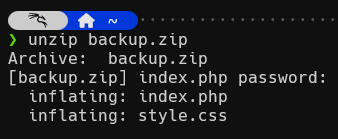
And that is all for today. The next time we will take a look at the extracted files and continue our journey to crack “Vaccine”.
Best regards, k4nnix